Multi-location
Keep stock godown by godown and move it between them. Put staff on the site they work at. Run more than one business from the same login.
ERP for Indian businesses
PaySaathi runs sales, purchases, stock, production, accounts, GST, your sales team and payroll on one set of books. Built for the desktop, open on your phone.
Get to know PaySaathi
Each module is a part of the business. They share the same parties, items and accounts, so nothing is entered twice.
Quotation to order to challan to invoice, each one made from the last.
See all featuresPurchase orders, goods receipts and supplier bills, matched to each other.
See all featuresEvery item, in every godown, moved by the documents themselves.
See all featuresBills of material, production orders, runs and job work.
See all featuresReceipts, payments and journals, through to the balance sheet.
See all featuresGST bills, e-invoice and e-way bill from the same screen.
See all featuresTargets, tasks and a leaderboard for the people who sell.
See all featuresAttendance, shifts, leave and salary for everyone on the rolls.
See all featuresFrom the day’s vouchers to a 360° view of the year.
See the reportsThe desktop module
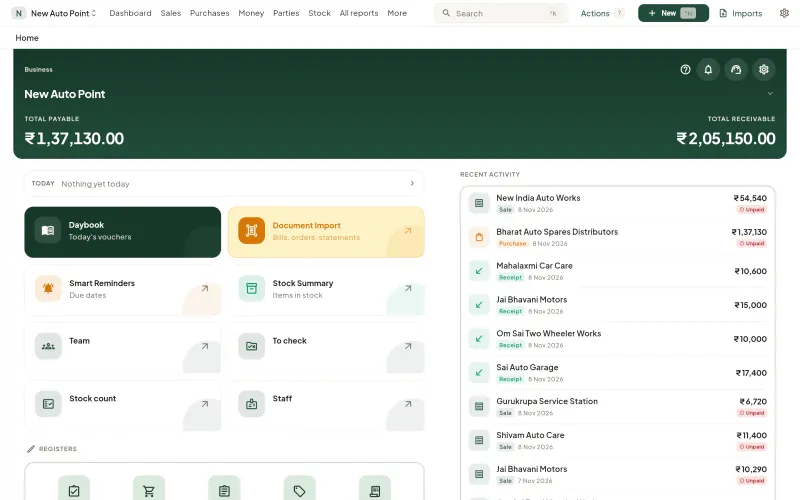
A full-width workspace with a keyboard shortcut for everything you do all day.
Fifteen document types under one New button. Fill a bill line by line without reaching for the mouse.
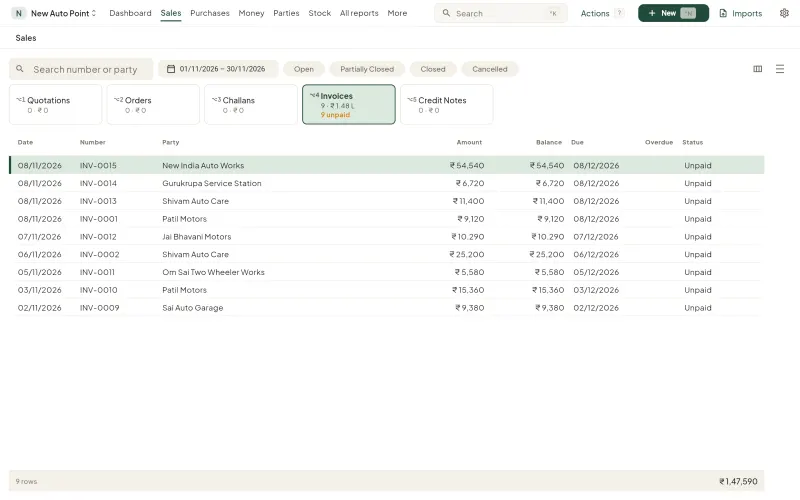
Quotations, orders, challans, invoices and credit notes in tabs. Sort, search and open any one.
Open an invoice to see its items, its receipts, what it was made from, and its history.
One set of books
In PaySaathi a document does not sit in one module. Saving it moves stock, updates the party’s account, and counts towards the salesman’s target, in the same moment.
Sales invoice INV-0015
New India Auto Works
₹54,540
SavedReady for a bigger business
Keep stock godown by godown and move it between them. Put staff on the site they work at. Run more than one business from the same login.
Decide what each person can see and do. Documents that need a yes wait in one list for the person who gives it.
Built for the desktop, where the work is done. The same books open in your phone’s browser when you are away from it.
Add your own fields to items and documents. Save the reports you open most as My reports.
Who it’s for
Raw material in, finished goods out, and job work in between.
A sales team in the market and stock in more than one godown.
Many parties on credit, and bills going out all day.
Fast GST bills at the counter and stock you can trust.
Then use Takkada, our other product. It puts your Tally on your phone and keeps Tally as your books.
Questions
PaySaathi is an ERP for Indian businesses. Sales, purchases, stock, production, accounts, GST, your sales team and payroll run on one set of books.
No. PaySaathi keeps your books itself, through to the trial balance, profit and loss and balance sheet. There is nothing to install and nothing to connect.
Yes. PaySaathi is built for the desktop. Open app.paysaathi.com in any browser and sign in. The same login works in your phone’s browser.
Yes. Stock is kept by godown and moved between godowns, staff are assigned to sites, and one login can hold more than one business.
Yes. You set up bills of material, raise production orders, record production runs, and track job work.
Yes. Save your GST portal credentials once, then both are generated from the bill itself. The IRN, the QR code and the e-way bill number are saved on that bill.
Android and iPhone apps are coming soon. Until then PaySaathi works in your phone’s browser with the same login.
Every new business starts with a free 7-day trial. For plans after the trial, WhatsApp or call us on +91 94359 77777.
Only the people you add to your business, and only the parts you allow. You can delete your data yourself from Settings, under Delete my data.
Sign in with your mobile number. The first 7 days are free.